 LinkedOutreach
You can't create multiple LinkedIn accounts for outreach under your own name. LinkedIn allows one account per person and blocks most second signups on the same IP or device. Teams that need more sending capacity rent warmed profiles instead.
One profile sends about 100 connection requests a week. Reaching 2,000 people a month takes five. This guide shows why second accounts get blocked, what people try to get around it, what it costs and how renting compares.
Quick answer
- LinkedIn's User Agreement allows one account per person in your real name.
- The IP address is only one signal. LinkedIn also reads your device, phone number, ID and early activity.
- LinkedIn stopped 88.9 million fake accounts at signup in the second half of 2025.
- Creating accounts with proxies and anti-detect browsers takes weeks and carries a high risk of a ban.
- Renting a warmed profile costs $129 a month and sends in the first week. A restricted profile is replaced for free.
Creating vs renting a LinkedIn profile at a glance
Creating looks cheaper until you add your time and the accounts you lose.
Can you have multiple LinkedIn accounts?
No. LinkedIn allows one account per person and it has to be in your real name.
The User Agreement says "you will only have one LinkedIn account, which must be in your real name". It also bans false identities and profiles made for anyone other than yourself.
LinkedIn enforces the rule hard. Its own Community Report shows how many fake accounts it stopped between July and December 2025.
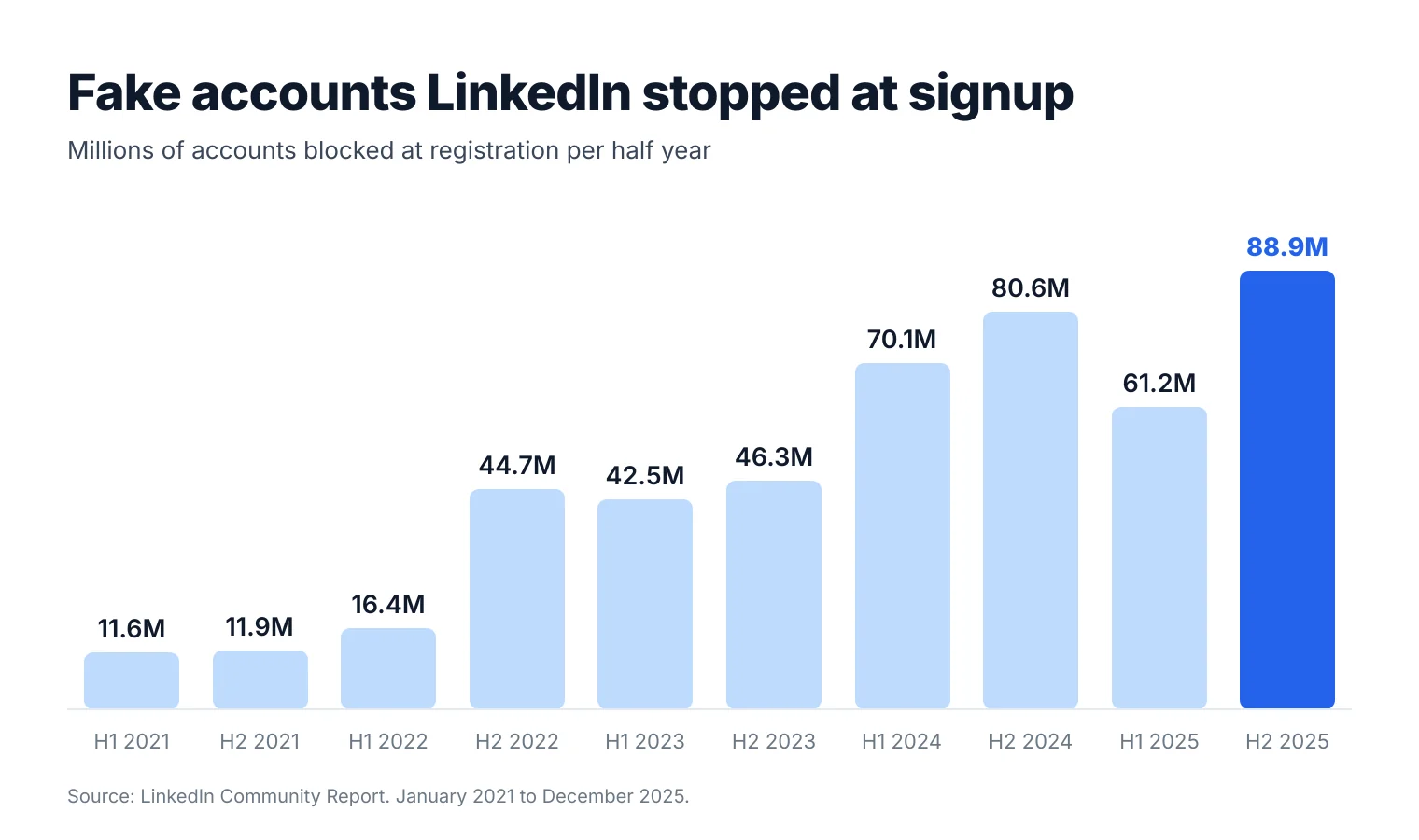
Signup blocks have grown more than seven times since early 2021. Almost all of it is automated. No person reviews your second signup before it fails.
What happens when LinkedIn catches a second account
- The signup fails or the new account is restricted within days
- LinkedIn asks for a government ID to unlock it
- Your main profile can get restricted too if both accounts share a device or phone number
Why LinkedIn blocks multiple accounts on the same IP
Most people blame the IP address. It is only one of five signals. LinkedIn does not publish its detection rules. These five show up again and again when second accounts get restricted.
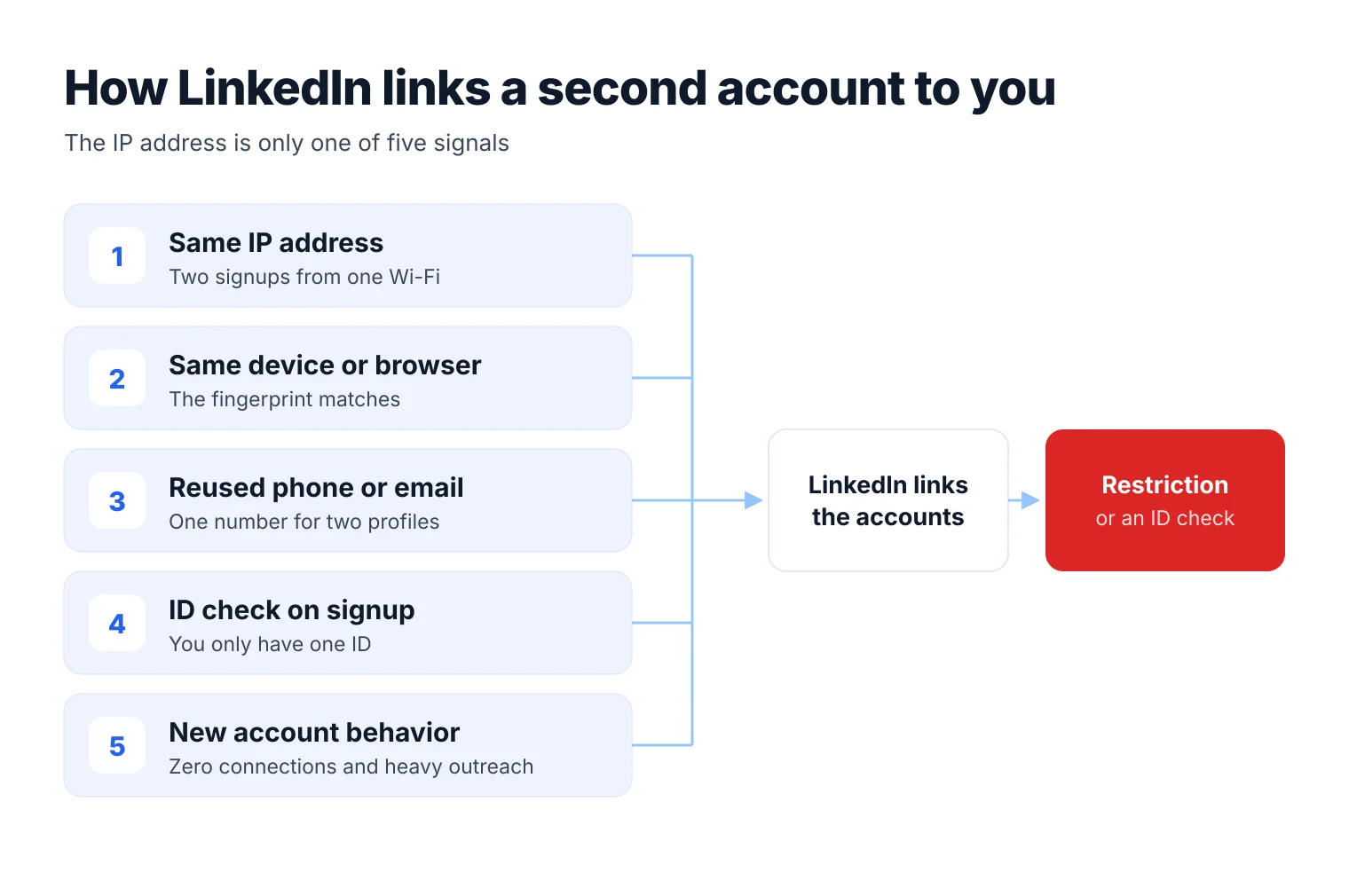
1. Same IP address
Two signups from one home or office connection look like one person. This is the check most people hit first because they create the second account on the same Wi-Fi as the first.
2. Same device and browser fingerprint
Your browser reports its screen size, fonts, graphics card and time zone. Together they identify your laptop. Incognito mode and cleared cookies do not change any of it.
3. Reused phone number or email
LinkedIn asks new accounts to confirm a phone number. One number cannot back two profiles. Virtual numbers are often rejected at this step.
4. ID verification on new accounts
A new account that looks risky gets a prompt to upload a government ID. You have one ID. The second account stops here.
5. New account behavior
A profile with zero connections that sends 50 invites on day two does not look like a new member. Even a clean new account should stay near 20 to 30 invites a week until it has about 100 connections. See how a restriction escalates in our outreach guide.
How people try to create multiple LinkedIn accounts
Each method below fixes one signal and leaves the others open. That is why most people end up stacking all of them.
1. New emails and SIM cards
A fresh email and a new SIM get you past the signup form. They do nothing about your IP or your device. Open the new account on the same laptop and LinkedIn sees the same person with a new phone number.
2. Proxies and VPNs
A proxy gives each account its own IP. A static residential proxy costs about $2 to $5 per IP a month. A dedicated mobile proxy runs from $27 to $130 a month.
Skip VPNs. Thousands of users share each VPN address and LinkedIn has seen most of them before. Cheap shared proxies have the same problem.
3. Anti-detect browsers
Tools like GoLogin, Multilogin and AdsPower give each account its own browser fingerprint. Plans start around $9 to $49 a month for 10 to 100 profiles.
They work only if you never slip. Log in to the second account once from your normal Chrome and the two profiles are linked for good.
4. Asking teammates to open accounts
This is the one method LinkedIn allows because each account belongs to a real person. It stops working at your headcount. People also leave and take their profile with them. And not everyone wants cold outreach going out under their name.
What each method fixes
| Method | Fixes | Leaves open | Typical cost |
|---|---|---|---|
| New email and SIM | Phone and email reuse | IP, device, ID check | One SIM per account |
| Proxy | IP address | Device, phone, ID check | $2 to $130 per account a month |
| Anti-detect browser | Device fingerprint | IP, phone, ID check | $9 to $49 a month per plan |
| Teammate accounts | Everything | Nothing | Free but capped at team size |
Stack a SIM, a proxy and an anti-detect browser and a new account can pass signup. It still starts with zero connections and an identity that fails an ID check. No tool fixes that part.
So the process is time consuming and the risk of a ban stays high at every step. We don't recommend it for outreach you depend on.
What it costs to create LinkedIn accounts yourself
The tools are cheap. Time is the expensive part.
| Item | Cost per account | Note |
|---|---|---|
| Static residential proxy | $2 to $5 a month | Minimum for a stable IP |
| Dedicated mobile proxy | $27 to $130 a month | Higher trust and higher price |
| Anti-detect browser | $9 to $49 a month per plan | One plan covers 10 to 100 profiles |
| SIM or phone number | Varies by country | One per account |
| Warm-up | Weeks of manual activity | No shortcut |
| Replacement | Start again from signup | Every time an account is restricted |
A new account has to act like a new member first. That means a few invites a day and some profile activity for weeks. Push volume early and the account is gone along with the weeks you put into it.
Rent LinkedIn accounts for outreach instead
Renting means you pay a monthly fee to use an aged LinkedIn profile that someone else built and maintains. You connect it to your outreach tool and send from it. We cover the model in why people rent LinkedIn accounts.
A rented profile skips every problem above. It passed signup long ago. It already has connections and activity history. It can send real volume in the first week. The order itself takes a day or two. See how to rent a LinkedIn account for the steps.
| Rent a profile | Buy an account | Create it yourself | |
|---|---|---|---|
| Ready to send | First week | Days | After weeks of warm-up |
| If it gets restricted | Free replacement | The money is gone | You start over |
| Cost | $129 a month | $300+ one time | Tools plus your time |
Thinking about buying? Read buy vs rent LinkedIn accounts first.
LinkedOutreach replaces restricted profiles for free with no monthly cap. For 10 or more accounts message us on Telegram for a bulk discount.
- Warmed profile with 200+ real connections
- Free replacement anytime and campaigns carry over
- US, EU and global regions · male or female
- ID verification and Sales Navigator at +$50/mo each
Red flags when renting LinkedIn accounts
If you get greedy on price you compromise on everything else. Check these five things before you pay.
The rental price guide covers more red flags in cheap rentals.
How many LinkedIn accounts do you need for outreach?
Plan for about 400 connection requests per account a month. That keeps each profile under the weekly limit with room to spare.
| Prospects per month | Accounts needed | Monthly rental at $129 |
|---|---|---|
| 500 | 2 | $258 |
| 2,000 | 5 | $645 |
| 5,000 | 13 | $1,677 |
Or enter your own number.
10+ accounts qualify for a bulk discount. Message us on Telegram.
Based on 400 connection requests per account a month. Accounts are rounded up.
How to run multiple LinkedIn accounts
These rules apply whether you rent the accounts or build them.
- One IP per account: Never log in to two accounts from the same IP. See how we set up LinkedIn infrastructure.
- One browser profile per account: Never open an outreach account in your everyday browser.
- Ramp up slowly: Start near 10 invites a day in week one. Move toward 20 a day over the next two weeks.
- Stay under 100 invites per rolling seven days: The limit resets seven days after each invite and not on Monday.
- Withdraw old invites: Pull back requests that sit unanswered for three weeks.
- Target tightly: When people click "I don't know this person" LinkedIn counts it against the account.
- One automation tool per account: Two tools on one profile double the activity LinkedIn sees.
Our LinkedIn outreach guide covers limits, tools and sequences in full.
Multiple LinkedIn accounts: FAQ
Can I create two LinkedIn accounts with the same email?
No. One email address belongs to one account. You can add several email addresses to a single account but you cannot split one address across two.
Can LinkedIn detect multiple accounts on the same IP?
Yes. IP is one of the signals it reads. A shared IP alone does not always trigger a block because families and offices share one too. A shared IP plus the same device or phone number does.
Is it illegal to have multiple LinkedIn accounts?
It breaks LinkedIn's User Agreement and not the law. The penalty is a restriction or a ban. Using a fake identity to deceive people is a different matter and can be illegal.
How many LinkedIn accounts can I run from one device?
One if you use a normal browser. With a separate browser profile and a dedicated IP for each account you can run as many as your machine handles.
Is renting safer than creating LinkedIn accounts?
It carries less risk for you. The profile is aged and you get a replacement if it is restricted. Your personal profile stays out of it. It is not risk free because LinkedIn can still restrict any account used by someone other than its owner.
How much does it cost to rent a LinkedIn account?
Most rentals cost $59 to $200 per profile a month. LinkedOutreach charges $129 with free replacement. See the full price breakdown.