 LinkedOutreach
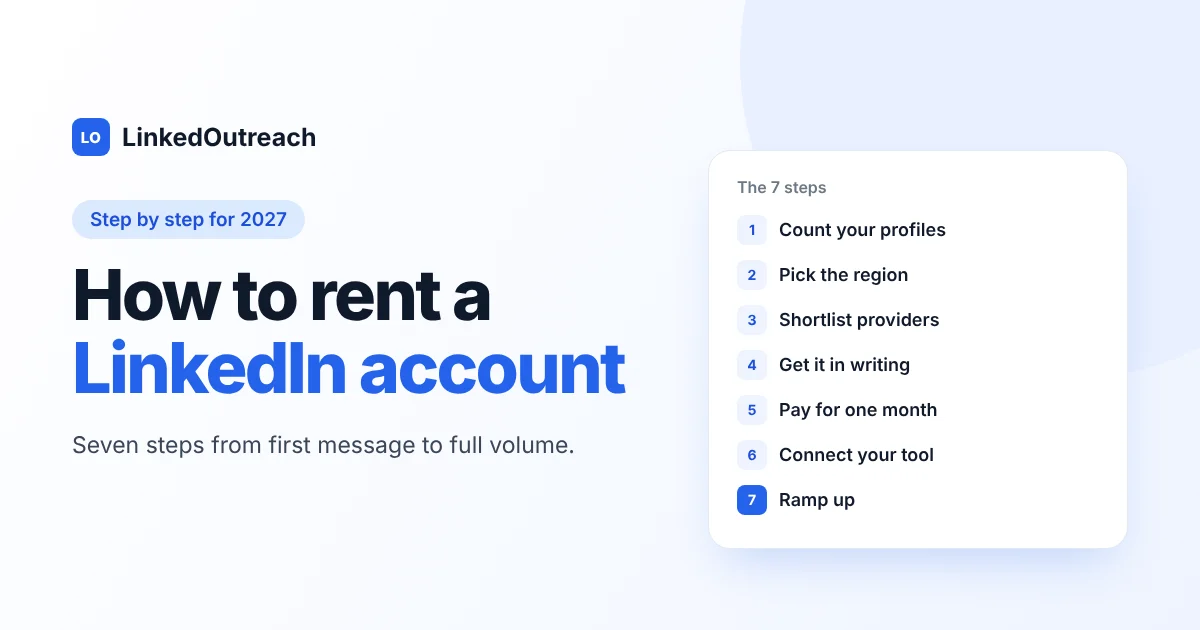
To rent a LinkedIn account you pick a provider and tell them the region and number of profiles you need. You get the profile details in writing and pay for a month. Then you connect the profile to your outreach tool and raise the volume over four weeks.
Ordering takes a day or two. Most mistakes happen before the payment and in the first week of sending. This guide goes through each step in order so you know what to ask and what to check in 2027.
Quick answer
- Renting takes seven steps. Count your profiles. Pick a region. Shortlist providers. Get the details in writing. Pay for a month. Connect your tool. Ramp up.
- Plan for about 400 connection requests per profile a month.
- Rentals cost $59 to $200 per profile a month. LinkedOutreach charges $129 with free replacement.
- Ask for account age, connection count, access method and replacement terms in writing before you pay.
- Start at 20 to 30 requests a week and reach about 100 by week four.
Red flags to check before you rent a LinkedIn account
The cheapest rental is rarely the cheapest month. Four things cause most of the trouble and you can spot all of them before you pay.
What you need before you rent a LinkedIn account
Have four things ready. They make the order faster and the first month less wasteful.
| What you need | Why it matters |
|---|---|
| A monthly prospect number | It decides how many profiles you rent |
| A target region | The profile should match the market you message |
| An outreach tool | The provider confirms it works with the profile before you pay |
| A lead list | A profile with nothing to send wastes its first paid month |
New to the model? Why people rent LinkedIn accounts covers what renting means and who it fits.
How to rent a LinkedIn account in 7 steps
The first five steps take a day or two. The last two take about four weeks.
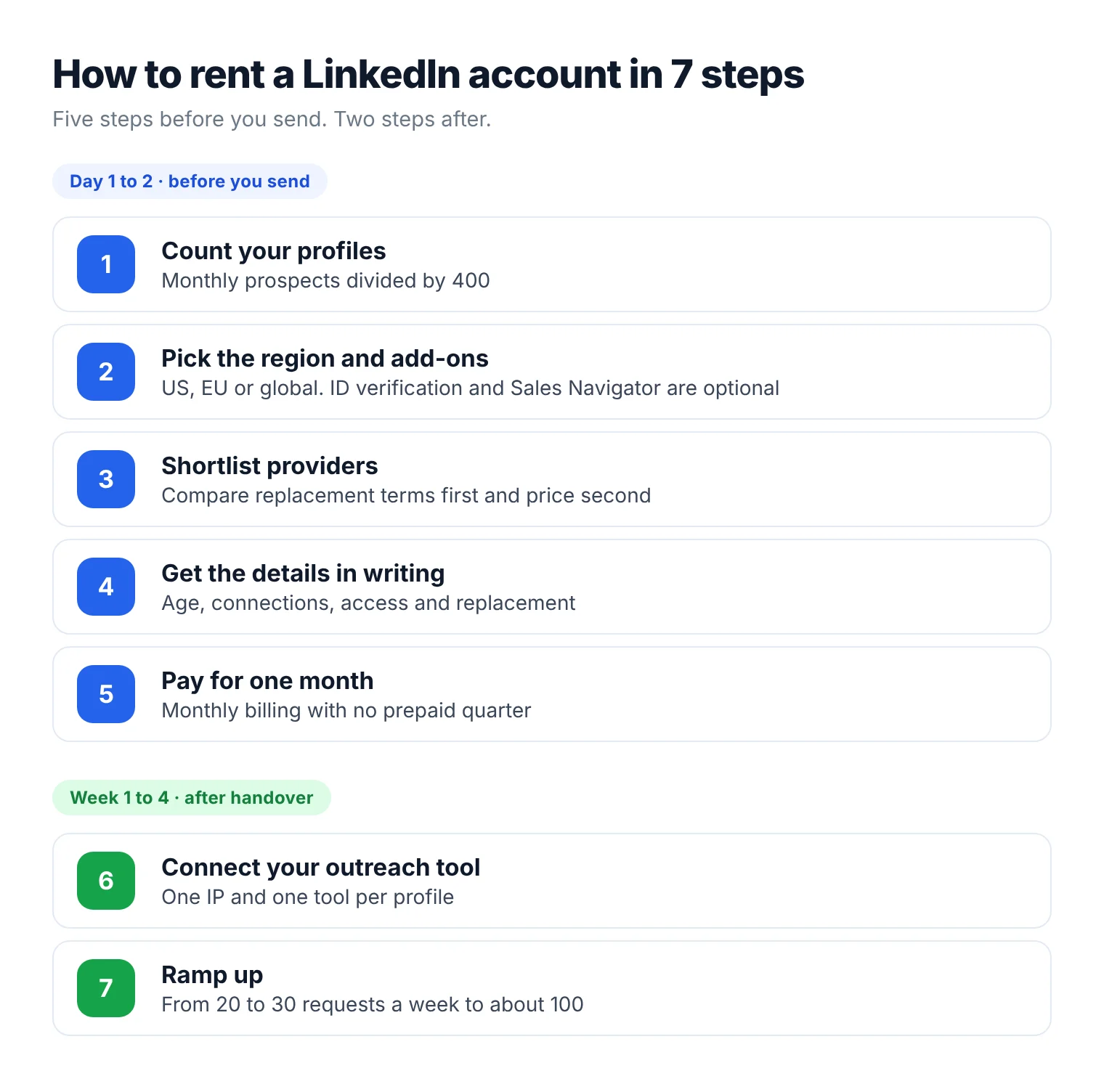
1. Work out how many profiles you need
One profile sends about 100 connection requests a week. Plan for 400 a month so each profile stays under the weekly limit.
Divide your monthly prospect number by 400 and round up.
| Prospects per month | Profiles to rent | Monthly rental at $129 |
|---|---|---|
| 400 | 1 | $129 |
| 2,000 | 5 | $645 |
| 4,000 | 10 | $1,290 |
No prospect number yet? Start from the meetings you need and work backwards. Our outreach guide shows the math.
2. Pick the region and profile type
Match the profile to the market. A US profile messages US prospects. An EU profile messages EU prospects.
Then decide on two add-ons.
- ID verification: It puts the verified badge on the profile. Consider it when you message senior buyers who check a profile before they reply.
- Sales Navigator: You need it if you build lists inside LinkedIn or want InMail. Skip it if your lists come from another source.
At LinkedOutreach each add-on costs $50 a month on top of the $129 base.
3. Shortlist two or three providers
Send each provider the same message. Give your region, your profile count and your outreach tool.
How they answer tells you a lot. A provider that takes two days to answer a sales question will not be faster when a profile goes down.
Compare replacement terms first and price second. LinkedOutreach replaces a restricted profile for free with no monthly cap.
- Warmed profile with 200+ real connections
- Free replacement anytime and campaigns carry over
- US, EU and global regions · male or female
- ID verification and Sales Navigator at +$50/mo each
4. Get the profile details in writing
Ask before you pay. Every answer should be in a message you can scroll back to.
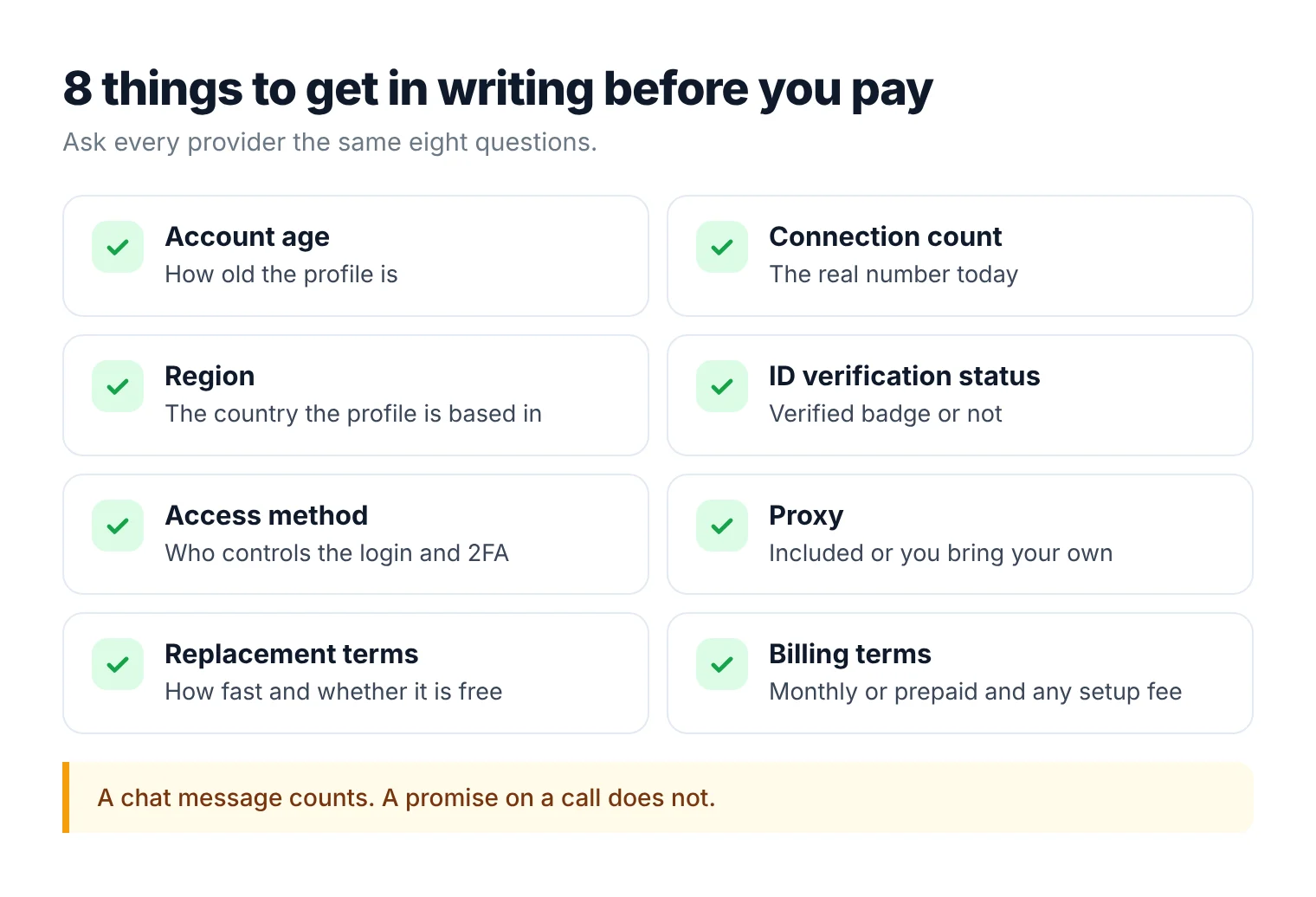
Two more questions are worth asking.
- Which profile fields can I edit?
- What were the profile's sending limits before handover?
5. Pay for one month first
Pick monthly billing. Some vendors ask for a quarter up front. A low monthly price with three months prepaid is a bigger bet than it looks.
Check for extra fees too. Some vendors charge a setup fee of $50 to $100 per account or a fee for each replacement. LinkedOutreach bills monthly with no setup fee and you can cancel anytime.
If the provider is new to you start with a small batch. Run it for two or three weeks and then add the rest. Ordering 10 or more? Ask for the bulk rate first. LinkedOutreach quotes bulk orders on Telegram.
6. Connect the profile to your outreach tool
Your provider confirms the access method before you pay and helps you connect the tool. Four rules keep the profile healthy from the first login.
- One IP per profile: Always the same IP and always in the profile's own country.
- A separate browser profile: Never open a rented profile in your everyday browser. LinkedIn can link it to your own account.
- One automation tool per profile: Two tools on one profile double the activity LinkedIn sees.
- A cloud tool: It runs when your laptop is off. LinkedIn also detects it less often than a browser extension.
Renting more than a few profiles? The setup around them matters as much as the profiles. See what a LinkedIn infrastructure setup includes.
7. Ramp up over the first four weeks
Don't start a newly handed over profile at full volume. A sudden jump in activity is one of the patterns LinkedIn restricts.
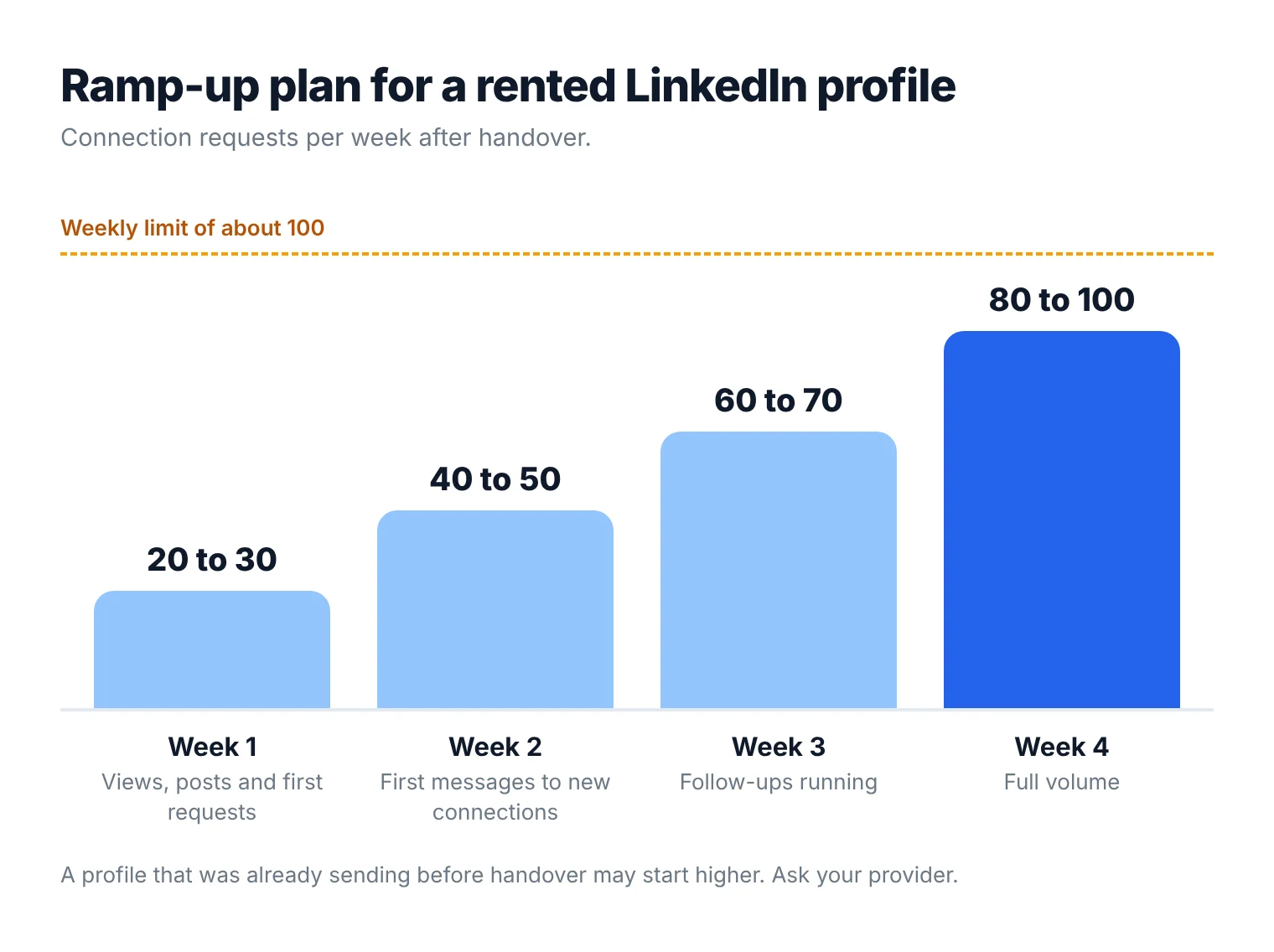
Spend the first days on quiet activity. View profiles. Accept requests. Post once or twice. Then send your first requests.
Keep three habits from week one.
- Withdraw requests that sit unanswered for three weeks.
- Keep each list tight. LinkedIn treats ignored requests as unwanted.
- Give each profile its own list so two profiles never contact the same person.
The weekly request cap is one of several. The limits section of our outreach guide lists the rest.
How much does it cost to rent a LinkedIn account in 2027?
Renting a LinkedIn account costs $59 to $200 per profile a month going into 2027. Most warmed accounts with real history sit between $90 and $150. LinkedOutreach charges $129.
The rental is not the whole bill.
| Item | Typical monthly cost |
|---|---|
| Account rental | $59 to $200 |
| Dedicated proxy if it is not included | $10 to $30 |
| Automation tool seat | $50 to $150 |
| Sales Navigator | $50 to $99 |
A mid-market setup lands near $270 per profile a month.
What to do if a rented LinkedIn account gets restricted
LinkedIn's User Agreement does not allow account sharing. Any rented profile can be restricted. Plan for it before it happens.
- Pause the campaign on that profile: Don't keep sending through a warning.
- Stay off new devices and VPNs: Logging in from somewhere new often makes a block last longer.
- Message your provider the same day: Send the profile name and what LinkedIn showed you.
- Move the leads: With a good provider the replacement arrives and the campaign carries over.
LinkedOutreach replaces a restricted profile for free with no monthly cap.
Mistakes to avoid when you rent a LinkedIn account
- Rent as many profiles as your lead list can feed
- Keep one IP and one tool per profile
- Check acceptance and reply rate per profile every week
- Add your company to the profile's experience
- Slow a profile down when its acceptance rate drops
- Choose a provider on price alone
- Send full volume in week one
- Log in from your everyday browser
- Run two profiles on one IP
- Send the same list from every profile
Should you rent, buy or create a LinkedIn account?
Renting is one of three ways to add sending capacity.
| Rent a profile | Buy an account | Create it yourself | |
|---|---|---|---|
| Ready to send | First week | Days | After weeks of warm-up |
| If it gets restricted | The provider replaces it | The money is gone | You start over |
| Cost | $59 to $200 a month | $300+ one time | Tools plus your time |
Buying looks cheaper after a few months. That holds only if the account never gets restricted. We compare the two in buy vs rent LinkedIn accounts.
Creating accounts costs the least on paper. LinkedIn blocks most second signups and a new account starts with zero connections. Our guide on creating multiple LinkedIn accounts explains why.
How to rent a LinkedIn account: FAQ
How long does it take to rent a LinkedIn account?
Ordering takes a day or two once you send your requirements. Delivery depends on the region and on current inventory. Allow about four weeks of ramp-up before a profile sends at full volume.
Can I rent just one LinkedIn account?
Yes. Rentals are billed per profile per month. One profile is enough to test a market. Bulk discounts start at 10 accounts.
Does LinkedIn allow renting an account?
No. LinkedIn's User Agreement does not allow account sharing. The usual penalty is a restriction on the rented profile. That is why free replacement matters and why you keep your own profile out of it.
Can I change the name and photo on a rented LinkedIn account?
It depends on the provider. Some lock the name, photo and location. Ask which fields you can edit before you pay. LinkedOutreach personalizes each profile to your business.
Do I need Sales Navigator on a rented account?
Only if you build lists inside LinkedIn or want InMail. If your lists come from another source the base profile is enough. LinkedOutreach adds Sales Navigator for $50 a month.
What happens to the connections when I stop renting?
They stay with the profile. You keep the conversations you moved to email or a call. Export your leads from your outreach tool before you cancel.