 LinkedOutreach
LinkedIn was the most effective outbound channel for most B2B teams in 2026. It will be again in 2027.
The reason is trust. Before a prospect reads your message they see your photo, your job title and the people you both know. There is no spam folder to fight either. Once someone accepts your request your message lands in the same inbox as messages from their colleagues.
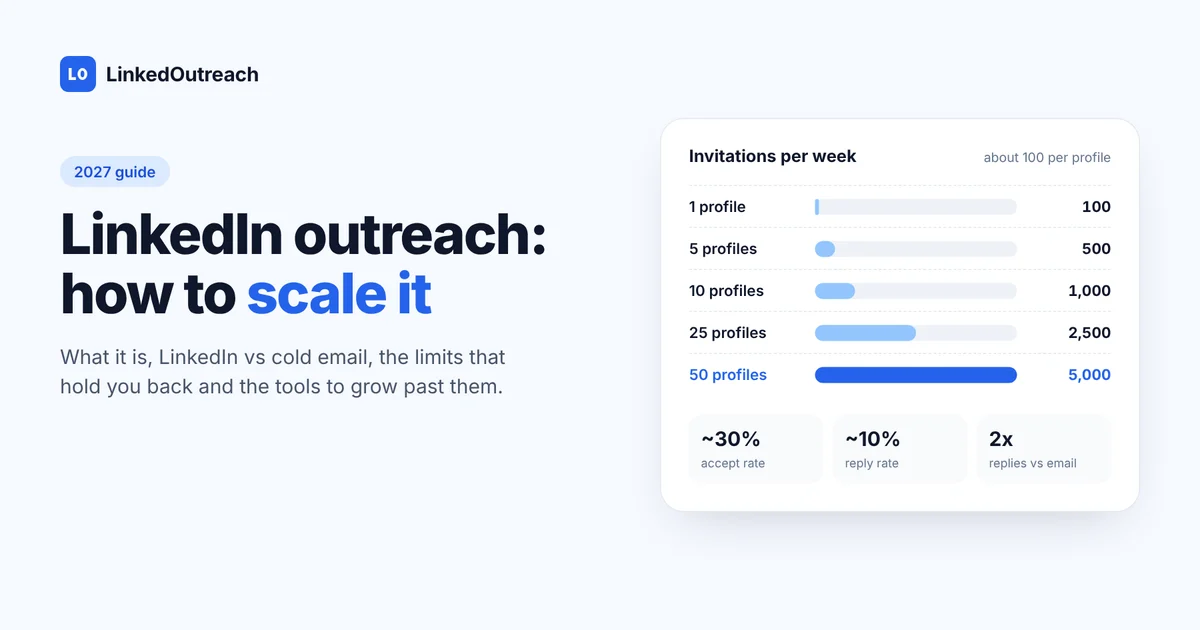
Most teams still run LinkedIn outreach from one or two profiles. That caps them at about 100 connection requests a week per profile. The teams that book the most meetings scale it differently and few of them share how. This guide covers what LinkedIn outreach is, what you need to scale it and the tools to use in 2027.
Quick answer
- LinkedIn outreach is sending connection requests and messages to prospects on LinkedIn to book meetings.
- It gets about twice the replies of cold email. Around 10% on LinkedIn and about 5% on email.
- Each profile can send about 100 connection requests a week. Free accounts get only 5 to 10 personalized notes a month.
- To send more you run more profiles. Most teams rent warmed profiles and give each one its own proxy.
- 10 profiles send about 1,000 requests a week. That is roughly 300 new connections and 30 replies.
What is LinkedIn outreach?
LinkedIn outreach means finding prospects on LinkedIn and sending them a connection request. When they accept you message them. You follow up two or three times. If they reply you book a call. If they don't you move on.
It works like cold email. The difference is what the prospect sees first. They can check your profile in a few seconds before they reply. An email from an unknown domain gives them nothing to check.
How LinkedIn outreach works
- Build a listFilter by title, company size, industry and region. Sales Navigator makes this faster.
- Warm upView their profile or like a post so they see your name before your request arrives.
- ConnectSend the request. Add a short note if you have notes left this month.
- Message and follow upOpen with something about them. Follow up two or three times. Then stop.
Types of LinkedIn outreach
| Type | Profiles | Requests a week | Who it fits |
|---|---|---|---|
| Manual | 1 | 20 to 50 | Founders working a short list of key accounts |
| Automated | 1 | Up to ~100 | Solo sellers who want their hours back |
| Multi-profile | 5 to 50+ | 500 to 5,000+ | Agencies and sales teams that need volume |
LinkedIn outreach vs cold email: which works better?
Both channels book meetings. They differ on reply rate, cost per sender and how much each sender can send.
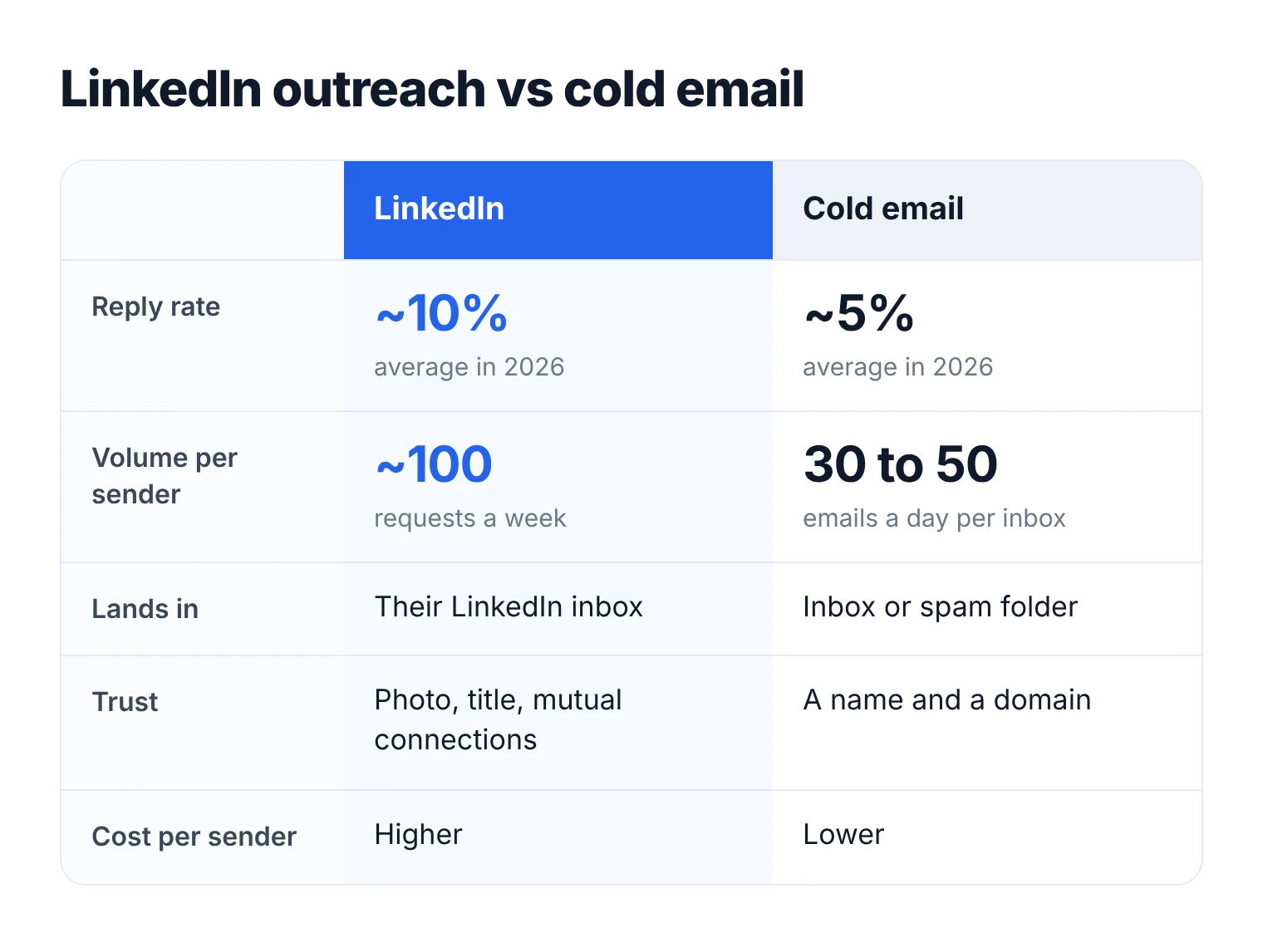
Cold email costs less per sender. A domain and a few inboxes cost far less than a warmed LinkedIn profile. Pick email when the list is large and the deal size is small.
Pick LinkedIn when the buyer is senior. Founders and directors get more email than they can read. On LinkedIn your message sits next to a real name and title. A prospect who ignored three emails often replies to one short LinkedIn message.
Most teams with high reply rates use both. Send the LinkedIn request first. Email the people who don't accept within a week. Message the people who do.
Why will LinkedIn outreach win in 2027?
Six things pushed B2B teams toward LinkedIn in 2026. None of them is going away in 2027.
1. Email providers got stricter
Google and Yahoo started enforcing bulk sender rules in 2024. Microsoft started rejecting non-compliant bulk mail to Outlook in May 2025. Anyone sending more than 5,000 emails a day to these providers now needs SPF, DKIM, DMARC and an unsubscribe link. Cold email still works. It takes more domains, more inboxes and more setup to send the same volume.
2. There is no spam folder on LinkedIn
LinkedIn messages don't go through email spam filters. Once a prospect accepts your request your message shows up in their LinkedIn inbox. They also get a notification on their phone.
3. LinkedIn gets about twice the replies
Expandi's 2026 data from 70,000+ campaigns puts the average LinkedIn reply rate at 10.3% and acceptance at 29.6%. The same report puts cold email at 5.1%, down from about 7% a year earlier. Expandi sells LinkedIn automation so check these numbers against your own campaigns.
4. Prospects can check who you are
LinkedIn has 1.2 billion members and most B2B buyers keep their title and company up to date. Your profile shows your photo, job history, mutual connections and recent posts. A prospect can check all of it before they accept. A cold email gives them a name and a domain.
5. Inboxes are full of templated AI email
AI writing tools made it cheap to send personalized cold email in bulk. Many teams did. Buyers now get dozens of emails that read the same and skip most of them. A short LinkedIn message from a real profile is easier to notice.
6. Your posts warm up your prospects
The profile that sends requests can also post. Once a prospect accepts they see your posts in their feed. When your message arrives they may already know your name.
What are the LinkedIn outreach limits?
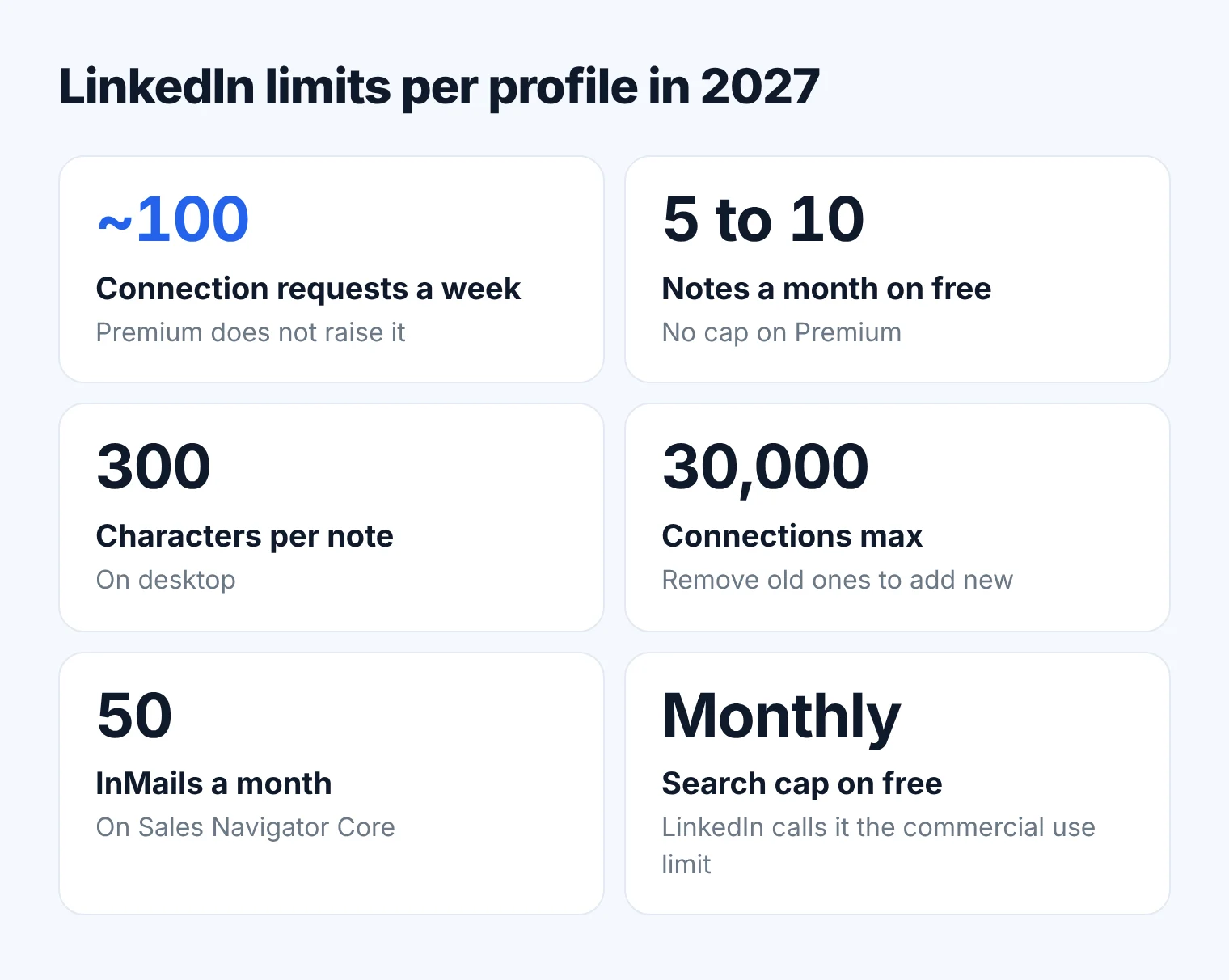
LinkedIn caps what each profile can do. These caps are the main reason one profile can't support a sales team or an agency.
| Limit | Free account | Premium or Sales Navigator |
|---|---|---|
| Connection requests | About 100 a week | About 100 a week |
| Personalized notes | 5 to 10 a month | No monthly cap |
| Note length | 300 characters on desktop | 300 characters on desktop |
| Messages to connections | No published cap | No published cap |
| InMail credits | None | 15 a month on Premium Business. 50 on Sales Navigator Core |
| Total connections | 30,000 | 30,000 |
| Search | Monthly commercial use limit. 1,000 results per search | No commercial use limit. Up to 2,500 results per search |
| Profile views | About 80 to 150 a day | Higher |
LinkedIn doesn't publish most of these numbers. The weekly figure comes from what users and tool vendors report. New profiles get less. Start a new profile at 20 to 30 requests a week and raise it over a few weeks.
What gets a LinkedIn account restricted
LinkedIn rarely restricts an account for one action. It restricts patterns that look automated or unwanted.
- Sudden jumps in volume. Going from 10 to 100 requests a day on a quiet profile often triggers a warning.
- Low acceptance rate. When most people ignore your requests LinkedIn treats them as unwanted. Loose targeting is the usual cause.
- Too many pending requests. Withdraw requests older than two or three weeks.
- Several profiles on one IP or device. LinkedIn links the profiles. A restriction on one can spread to the others.
- Browser extensions. Extensions that click and type inside the LinkedIn page are easier to detect than cloud tools.
- Reports from prospects. A few "I don't know this person" reports in a short time can trigger a block.
How a LinkedIn restriction escalates
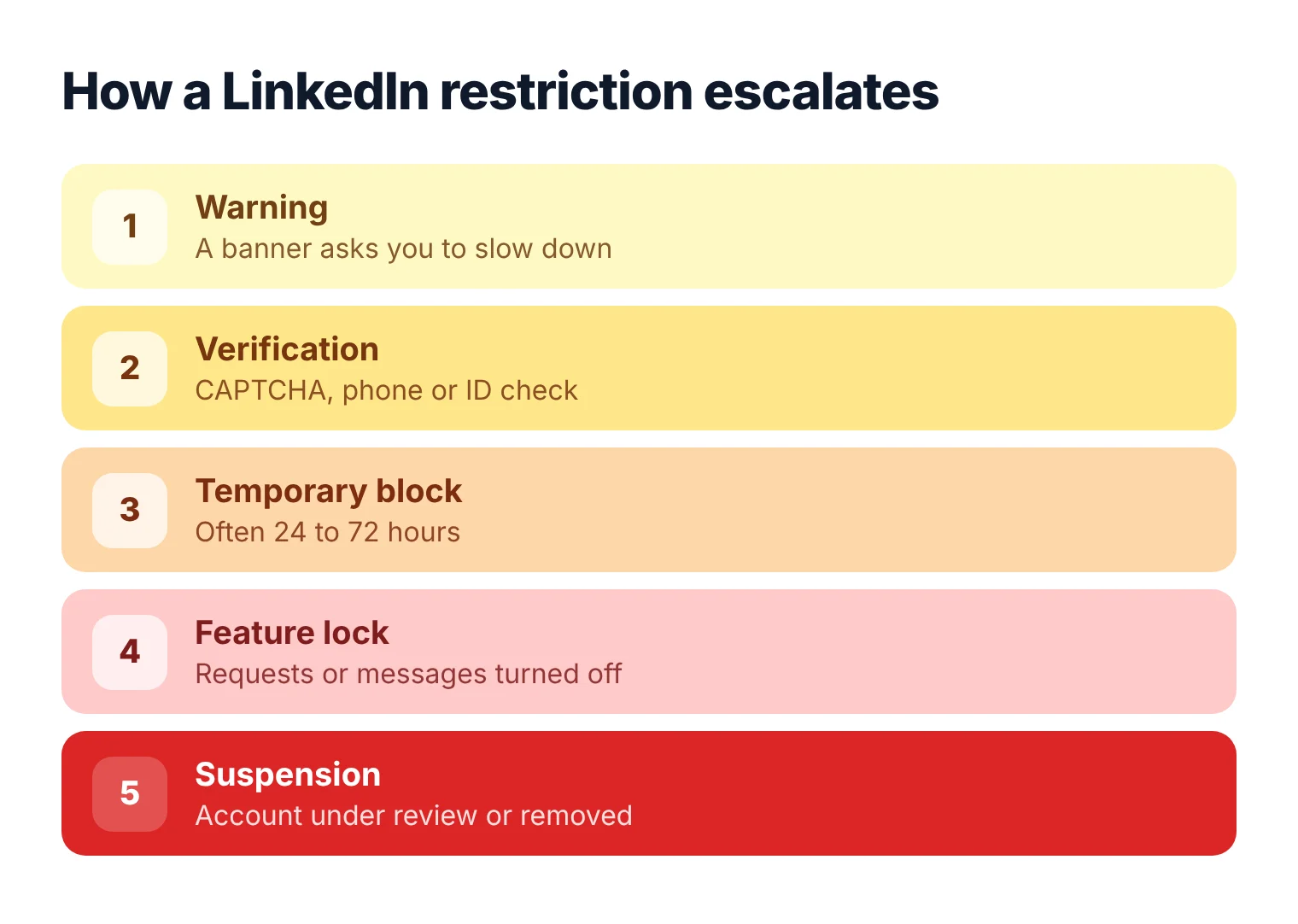
If you get a warning stop the action that caused it and wait. Logging in from a new device or a VPN during a block often makes it last longer.
What do you need to scale LinkedIn outreach?
Pushing one profile harder gets it restricted. The cap is per profile. To send more you run more profiles and keep each one healthy. You need five things.
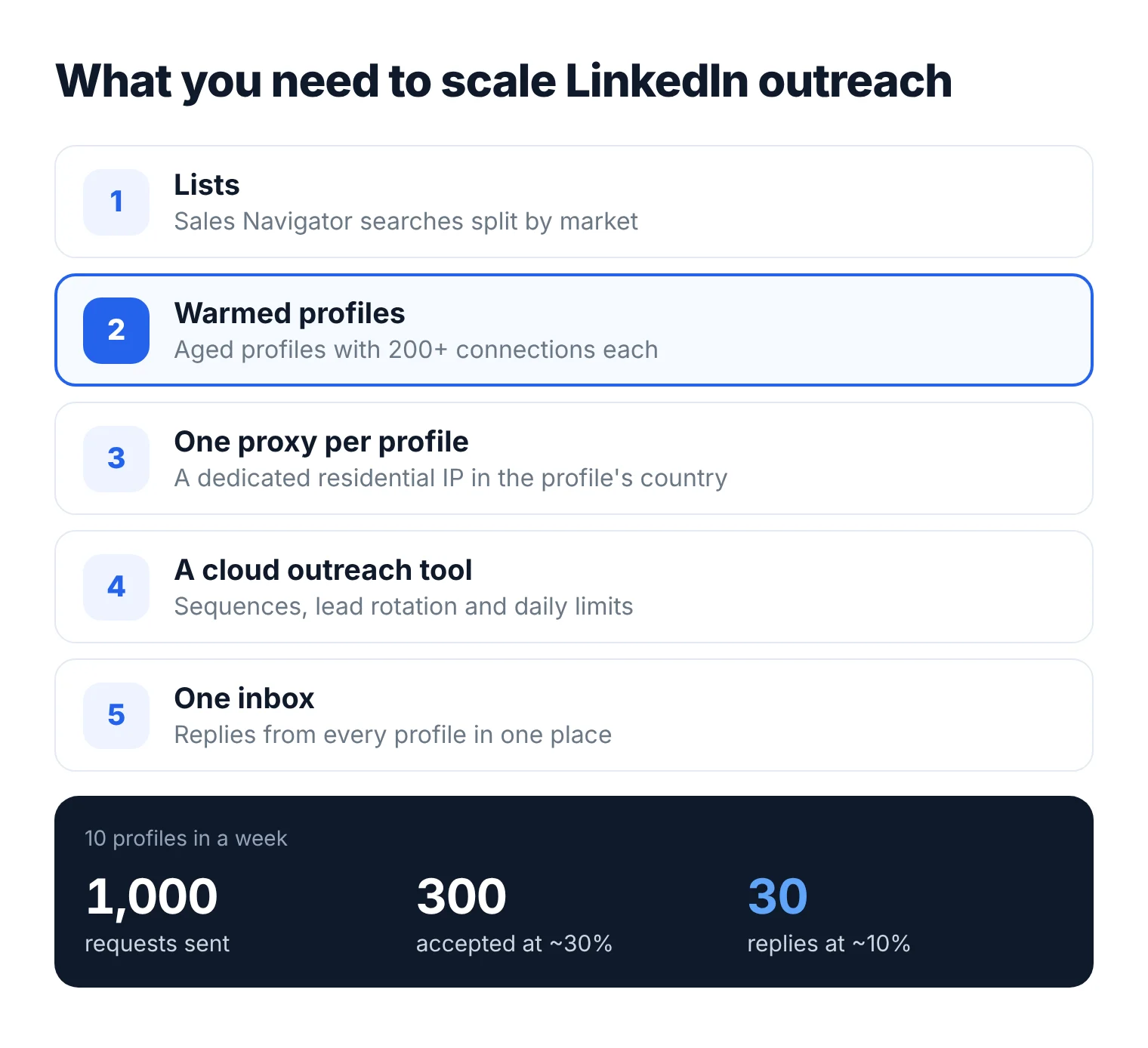
The profiles are the part most teams get wrong. A new profile has no network and gets restricted fast. That is why teams rent LinkedIn accounts instead of building dozens of their own.
How to scale LinkedIn outreach in 2027
1. Work out how many profiles you need
Start with the meetings you need each month and work backwards. Say you need 20 meetings and one in three replies books a call. That is 60 replies. At a 10% reply rate you need about 600 new connections. At 30% acceptance that is about 2,000 requests a month. One profile sends about 400 a month. So you need five profiles.
2. Add more profiles
- Rent warmed profiles. They are ready in days and get replaced if LinkedIn restricts them. Most teams start here. Prices run $59 to $200 a profile a month. See the full LinkedIn account rental price breakdown and how to rent a LinkedIn account step by step.
- Buy accounts. You pay once. If the account gets restricted you lose it. We compare both in buy vs rent LinkedIn accounts.
- Build your own. It costs nothing. A new account needs weeks of normal use before it can send safely and it starts with no network.
Your team's own profiles count too. Many sales teams run outreach from every rep's profile. When a rep leaves they take the profile and all its conversations with them.
3. Give every profile its own proxy
Each profile should always log in from the same IP in its own country. If several profiles share one IP LinkedIn can link them and a restriction on one can hit the rest. Most cloud outreach tools let you assign a dedicated proxy to each profile when you connect it.
4. Warm up each profile before you send
Don't start a new or newly handed over profile at full volume. Spend the first week or two viewing profiles, accepting requests and posting once or twice. Then start at 20 to 30 requests a week and add 10 to 20 more each week.
5. Run all profiles in one cloud tool
Pick a tool built for many senders. It should rotate leads across profiles, set daily limits per profile and put every reply in one inbox. With 20 profiles open in separate browser tabs you will miss replies.
6. Give each profile its own list
Split your list by market and give each profile one segment. A US profile messages US prospects. An EU profile messages EU prospects. Make sure two profiles never contact the same person.
7. Keep messages short
Leave the pitch out of the connection request. Open with something about their company or role. Ask one easy question. Keep each follow up to two or three lines.
8. Add email for people who don't accept
Some prospects never accept on LinkedIn. Find emails for them and add an email step. A combined sequence reaches more of your list than either channel alone.
9. Track each profile every week
Check acceptance rate, reply rate and warnings for each profile. If one profile's acceptance drops slow it down and check its list. Replace restricted profiles fast so the campaign keeps running.
Assumes about 100 requests a week per profile, 30% acceptance and 10% replies on new connections. Tool seats and Sales Navigator cost extra.
Best LinkedIn outreach tools for 2027
Scaling takes two kinds of tools. Profile providers give you more sending capacity. Automation tools run sequences across those profiles. Most teams also pay for Sales Navigator to build lists.
| Tool | What it does | Price | Best for |
|---|---|---|---|
| LinkedOutreach Top pick | Rents warmed LinkedIn profiles | $129/mo per profile | Adding profiles fast with free replacement |
| LinkedAccount Top pick | Rents warmed LinkedIn profiles | $129/mo per profile | Teams that want a dedicated success manager |
| HeyReach | Runs many LinkedIn senders in one tool | From $79/mo per sender. $999/mo for 25 senders | Agencies with many profiles |
| Expandi | Cloud LinkedIn and email sequences | $99/mo per seat. $79 billed yearly | Teams that want a dedicated IP per seat |
| Dripify | Cloud LinkedIn sequences | From $79/mo per seat. $59 billed yearly | Small teams with simple campaigns |
| Waalaxy | LinkedIn sequences. Email on the top plan | From about €19/mo per user | Solo users on a small budget |
| lemlist | Email sequences with LinkedIn steps | $109/mo per user on Multichannel | Teams that already run cold email |
| La Growth Machine | LinkedIn, email and calls in one sequence | From €60/mo per identity | Multichannel sequences |
| Sales Navigator | LinkedIn's own search and lead lists | $119.99/mo Core. $89.99 billed yearly | Building lists and 50 InMails a month |
Prices come from public pricing pages and published reviews checked in November 2026. Confirm them before you buy.
Best LinkedIn profile providers
Every automation tool in the table needs LinkedIn profiles to send from. The number of healthy profiles you run sets how much you can send. These two providers rent warmed profiles with free replacement.
- Warmed profile with 200+ real connections
- Free replacement anytime and campaigns carry over
- US, EU and global regions
- Works with the automation tools above
- ID verification and Sales Navigator at +$50/mo each
- Pre-warmed profile with 200+ connections
- Profile replacements at no extra charge
- Ongoing health monitoring
- Dedicated success manager
- ID verification and Sales Navigator at +$50/mo each
Be careful with very cheap profiles. Low prices usually come with capped replacement and slow support. If a profile goes down you can wait days for help while your campaign stops. We list the red flags in cheap LinkedIn rentals in our pricing guide.
How to pick an automation tool
- Cloud based. A cloud tool runs when your laptop is off. LinkedIn also detects it less often than a browser extension.
- Multi-profile support. Past three profiles you need lead rotation across senders and one shared inbox.
- Limits per profile. You should set daily caps and a ramp for each profile on its own.
- Proxy handling. Some tools give each seat its own IP. Others ask you to bring your own.
Know the risk. LinkedIn's User Agreement does not allow third-party automation or account sharing. LinkedIn can restrict any profile. Daily limits, one proxy per profile and fast replacement lower that risk.
LinkedIn outreach FAQ
What is LinkedIn outreach?
LinkedIn outreach is sending connection requests and messages to prospects on LinkedIn to start sales conversations and book meetings.
Is LinkedIn outreach better than cold email?
LinkedIn gets about twice the replies of cold email. The 2026 averages were around 10% and 5%. Email costs less per sender. Most teams get the best results running both in one sequence.
How many connection requests can I send on LinkedIn?
About 100 a week per profile. LinkedIn doesn't publish the exact number and Premium does not raise it. Start new profiles at 20 to 30 a week.
How do I send more than 100 requests a week?
Run more profiles. Each profile has its own weekly cap so 10 profiles send about 1,000 requests a week. Give each one its own proxy and run them in one cloud tool. The fastest way to add profiles is to rent LinkedIn accounts.
Is LinkedIn automation safe?
No tool is fully safe because LinkedIn's terms don't allow automation. You can lower the risk. Use a cloud tool. Ramp up slowly. Keep acceptance high with tight lists. Give each profile its own IP.