 LinkedOutreach
Renting a LinkedIn account means you pay a provider every month to run outreach from a real aged profile. You don't own it. You send from it and the provider looks after warm-up, account health and replacement.
Most people rent because one profile is not enough. LinkedIn caps how many connection requests and messages one profile can send. This guide covers what renting means, how it works and why agencies, GTM teams and founders do it.
Quick answer
- Renting a LinkedIn account means paying monthly to use a warmed profile that someone else owns.
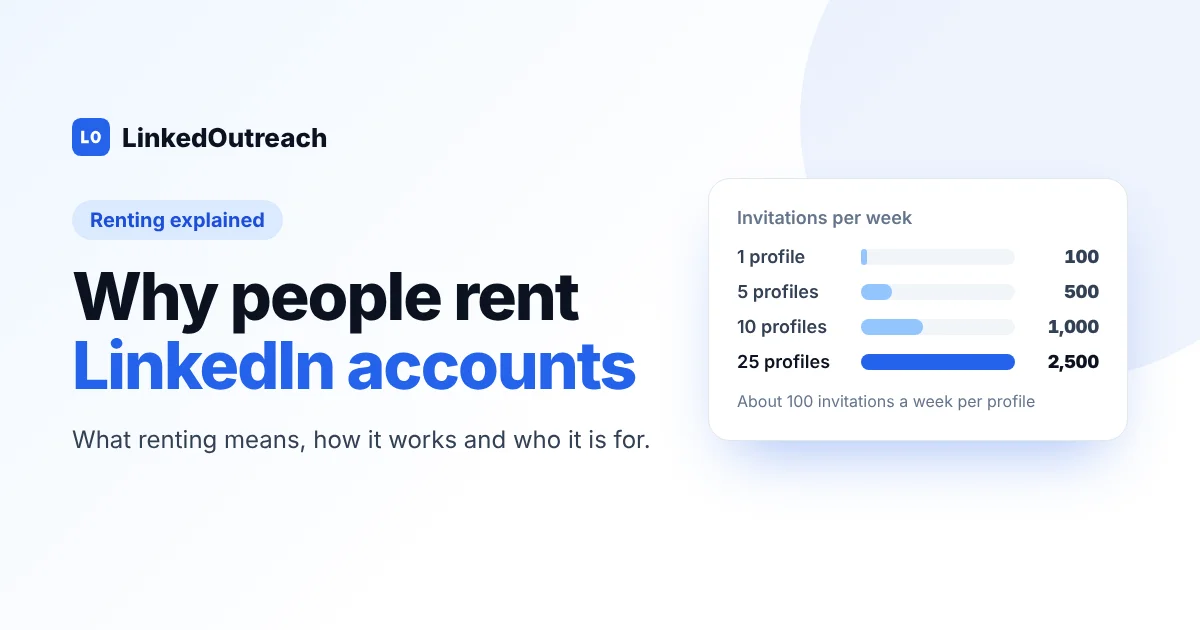
- People rent to send more. LinkedIn caps connection requests and messages per profile. Invitations top out at about 100 a week.
- Agencies rent several profiles per client. Founders rent to keep their own profile safe.
- Rentals cost $59 to $200 per profile a month. See the full price breakdown.
- The main risk is restriction. Pick a provider that replaces accounts for free.
What does renting a LinkedIn account mean?
You get access to a LinkedIn profile that already has age, activity and connections. You connect it to your outreach tool and send from it like any other account. The owner stays the same. You pay per profile per month and cancel when you're done.
- A real profile with history
- 200+ existing connections
- A profile in the region you target
- Warm-up and health checks
- A new profile if one gets restricted
- Ownership of the account
- The network once you stop paying
- A profile with your own name on it
- Protection from LinkedIn's rules
How does renting a LinkedIn account work?
Most providers follow the same four steps. This is how renting with LinkedOutreach works.
- Share what you needTell the provider your target region, how many profiles you want and which outreach tool you use.
- Get a warmed profileThe provider assigns an aged profile with existing connections and confirms the details before you pay.
- Connect your toolYou plug the profile into your sequencer and start sending. The provider helps with setup.
- Scale or swapAdd profiles as you grow. If one gets restricted you get a replacement and your campaign carries on.
Ready to order? How to rent a LinkedIn account covers each step and what to get in writing first.
Why do people rent LinkedIn accounts?
Seven reasons come up again and again.
1. One profile hits the limit fast
LinkedIn caps how many connection requests and messages one account can send. It doesn't publish the numbers. Most teams see a cap of about 100 invitations a week. Go past it and LinkedIn shows the invitation limit warning. More profiles is the only way to send more.
The weekly cap varies by account. Treat 100 as a ceiling and plan below it.
2. Your own profile stays safe
Your personal profile holds years of real connections. If it gets restricted you lose your network and your inbox. Many founders and sales leads run cold outreach from rented profiles and keep their own for warm conversations.
3. Agencies need multiple profiles per client
One profile can't carry a client's whole campaign. Agencies run several profiles per client to hit volume. Renting gives each client its own set. Conversations stay apart and one client's campaign can't burn another's.
4. New markets need local profiles
Prospects in Germany see a German profile differently from one in Texas. Renting lets you pick a profile from the US, the EU or another region without hiring people there.
5. The profile can post and build engagement for you
A rented profile can do more than send requests. You can post content from it and engage with your market. Add your company to its experience and it shows up as part of your team. Prospects who check the profile see someone active in your space before they reply.
6. Building your own takes weeks
A new LinkedIn account needs weeks of slow activity before it can send safely. It starts with zero connections. A rented profile is already warm and ready on day one.
7. Replacement is part of the deal
When your own account gets restricted you start over. With a good rental the provider swaps the profile and you keep sending. That is what you pay for.
Who rents LinkedIn accounts?
Three kinds of teams make up most renters.
- Agencies. They run outreach for many clients and need several profiles for each one.
- GTM and sales teams. They need more sending capacity per market than their reps' own profiles allow.
- Founders. They want outbound running without risking the profile they built over years.
Renting vs buying vs using your own profile
Renting is one of four ways to get more LinkedIn sending capacity. Here is how they compare.
| Option | Cost | Ready to send | If it gets restricted | Best for |
|---|---|---|---|---|
| Your own profile | Free | Now | You lose your own network | Low volume and warm leads |
| Build a new account | $0 plus weeks of time | Weeks | You start over | Teams with time to wait |
| Buy an account | $300+ one time | Days | The money is gone | Long-term in-house ops |
| Rent a profile | $59 to $200 a month | Days | The provider replaces it | Scaling fast with less risk |
Buying looks cheaper after a few months. That holds only if the account never gets restricted. Read the full comparison in buy vs rent LinkedIn accounts.
What are the risks of renting a LinkedIn account?
Renting is not risk free. Know these before you start.
- Restriction. LinkedIn's User Agreement does not allow account sharing. Any rented profile can be restricted.
- No ownership. The connections you build stay with the profile. You lose them when you stop renting.
- Weak providers. Cheap rentals often come with limited replacement terms and slow support. See the red flags in cheap rentals.
- Bad setup. Shared proxies and aggressive sending get accounts flagged fast. The infrastructure around the profile matters as much as the profile.
How to choose a LinkedIn account rental provider
Ask every provider these questions before you pay.
- How old are the accounts and how many connections do they have?
- Is a dedicated proxy included?
- How fast is a restricted account replaced and is it free?
- Which outreach tools do they support?
- Is billing monthly with no lock-in?
Two providers answer all of these well. Both replace restricted profiles for free with no monthly cap. For 10 or more accounts message LinkedOutreach on Telegram for a bulk discount.
- Warmed profile with 200+ real connections
- Free replacement anytime and campaigns carry over
- US, EU and global regions · male or female
- ID verification and Sales Navigator at +$50/mo each
- Pre-warmed profile with 200+ connections
- Profile replacements at no extra charge
- Ongoing health monitoring and a dedicated success manager
- ID verification and Sales Navigator at +$50/mo each
Want to compare all eight providers on price and guarantees? Read LinkedIn account rental price in 2026.
Why rent LinkedIn accounts: FAQ
What does it mean to rent a LinkedIn account?
You pay a provider each month to use a warmed LinkedIn profile for outreach. The provider owns the account and handles warm-up and replacement. You send from it through your own tool.
Why do agencies rent LinkedIn accounts?
Agencies need several profiles for each client to hit volume. Renting gives them that without building and warming dozens of accounts themselves.
How much does it cost to rent a LinkedIn account?
Most rentals cost $59 to $200 per profile a month. LinkedOutreach charges $129 with free replacement. See the full price breakdown.
Can I use my own outreach tool with a rented account?
Yes. Tell the provider which tool you use before you order. LinkedOutreach confirms compatibility and helps you connect it.
What happens if a rented account gets restricted?
It depends on the provider. Good providers replace it for free and your campaign carries over. Some budget providers only replace accounts in the first 30 days or cap free replacements each month.